
How to Use the Schengen Visa Calculator: Step-by-Step Guide
Introduction
Planning travel to the Schengen Area requires careful attention to the 90/180 day rule, which allows travelers to stay for up to 90 days within any rolling 180-day period.
Because the 180-day window moves forward day by day, calculating the exact number of remaining days can become complicated — especially for travelers who make multiple visits throughout the year.
The Schengen Calculator – 90/180 Day Rule Planner helps simplify this process by automatically analyzing your travel history and calculating your remaining days.
If you would like to understand the rule itself in more detail, see:
Schengen 90/180 Day Rule: How It Works and How to Calculate Your Stay
This guide explains how to use the calculator step by step.
Important Before You Start
When planning your next trip, make sure that the travel data you enter includes all visits to the Schengen Area during the previous six months.
For the most accurate results, enter your trips in chronological order, starting from the earliest trip and continuing to the most recent one.
Entering your travel history correctly allows the calculator to analyze the rolling 180-day period accurately.
Step 1: Enter Your Travel Data
To allow the system to calculate correctly, you must first enter the dates of your previous stays in the Schengen Area.
Date of Entry and Date of Exit
Use the calendar icons in the Date of Entry and Date of Exit fields to select your travel dates.
These fields represent the exact days you entered and left the Schengen Area.
Each stay will automatically generate the corresponding Days of Stay value.
Add a New Trip
If you have made multiple trips, you can add another record by clicking the green Add button at the bottom of the table.
This allows the calculator to include all relevant travel history when evaluating your remaining stay.
Step 2: Correct or Update Your Entries
If you enter a date incorrectly, you do not need to reset the entire table. The calculator allows you to easily modify your entries.
Update a Date
To correct an incorrect entry, simply click the calendar field in that row and select the correct date.
Insert a Missing Trip
If you forgot to add a trip between two existing records, you can insert a new row by clicking the green “+” symbol on the left side of the table.
Delete an Incorrect Entry
If a trip was added by mistake or if your travel plans changed, you can remove that entry by clicking the red “–” button at the end of the row.
Step 3: Calculate and Review the Results
After entering your travel data, click the green Calculate button.
The system will analyze your travel history and display several key results.
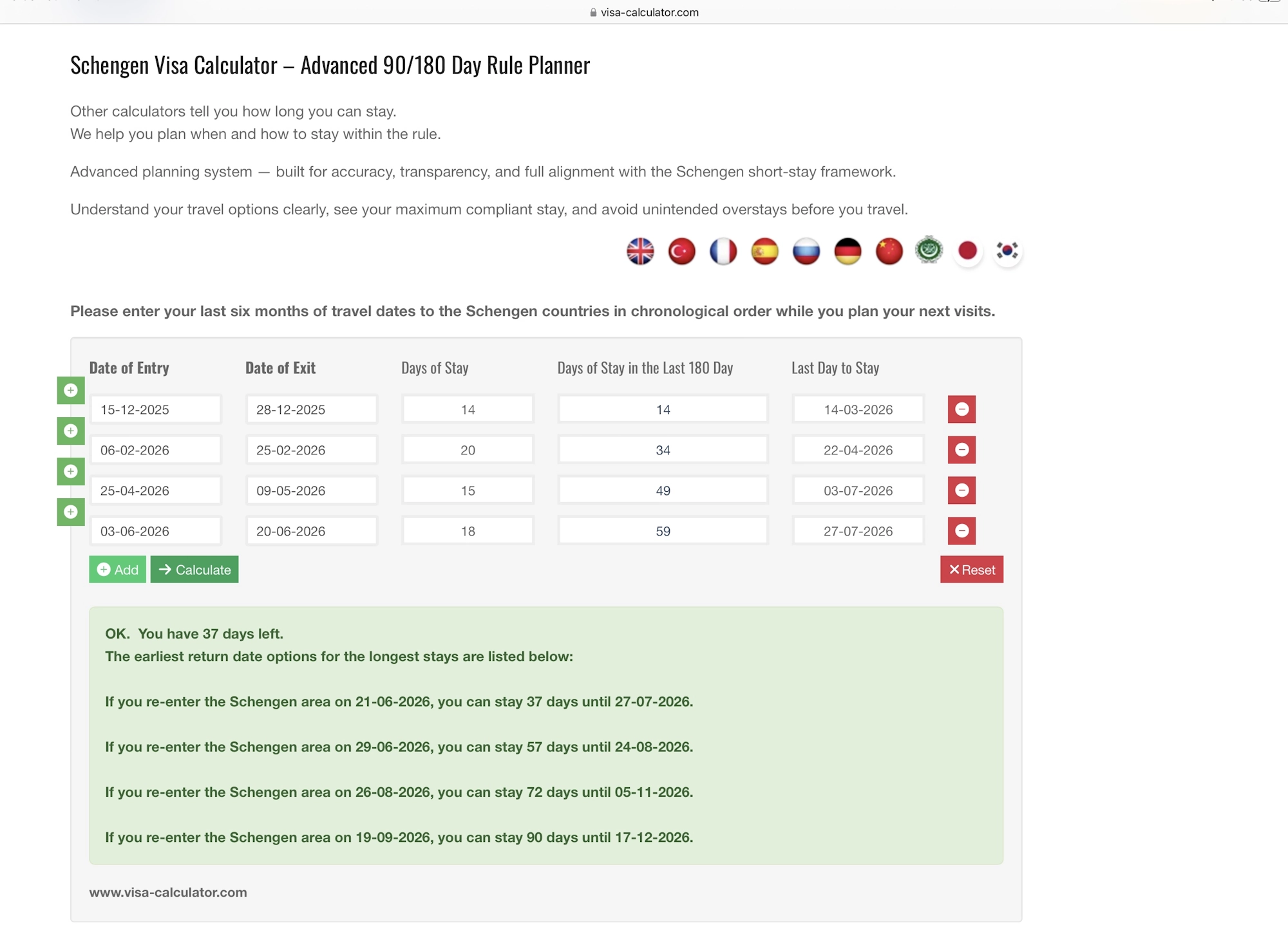
Days of Stay
The Days of Stay column shows how many days you stayed in the Schengen Area for each individual trip.
Days of Stay in the Last 180 Day
This column shows the cumulative number of days spent in the Schengen Area within the previous 180-day period.
Last Day to Stay
The Last Day to Stay field indicates the latest possible exit date that remains compliant with the 90/180 day rule.
 Example calculation using the Schengen Visa Calculator – 90/180 Day Rule Planner
Understanding the Result Panel
Below the calculator, the system provides a summary panel showing your travel status.
The panel may display:
• how many days you currently have available
• possible earliest return date options
• the maximum stay allowed for different future entry dates
This overview helps travelers plan their visits more safely and avoid unintended overstays.
Tip: Avoid Calculation Errors by Saving Your Travel History
When planning multiple trips, manually entering previous travel dates every time increases the risk of mistakes.
Even a small typing error can produce incorrect calculations.
To reduce this risk, you can use the Login button in the top-right corner of the page.
Registered users can:
• securely save their travel history
• avoid re-entering previous trips
• ensure consistent calculations
Helpful Tips When Using the Calculator
• You can change the interface language by clicking the flag icons above the planning tool.
• Clicking the Visa-Calculator logo on any page will return you to the homepage.
• For registered users, the Calculate button also saves your travel data automatically.
Plan Your Schengen Travel with Confidence
Understanding and applying the 90/180 day rule correctly is essential for responsible travel planning.
Using a reliable calculation tool helps travelers analyze past trips, test different travel scenarios, and determine their remaining stay with confidence.
You can try the planner here:
Schengen Visa Calculator – 90/180 Day Rule Planner
Last update: 14-06-2026 09:17